> ## Documentation Index
> Fetch the complete documentation index at: https://docs.intellikon.ai/llms.txt
> Use this file to discover all available pages before exploring further.
# Pulse overview
> What Pulse does, how it is laid out, and how contacts and deals move through it.
Pulse is where your team runs its outreach and follows it through to a sale. You bring the contacts you already have and describe the kind of customer you want to reach. Pulse writes a personal first message for each contact when you ask, you approve it and send it, and the later steps of the sequence follow on schedule. Replies come back to one inbox. When a conversation turns into an opportunity, you track it as a deal and send a quote.
Pulse does not find new contacts for you. It works with the contact list you already have.
## How Pulse is laid out
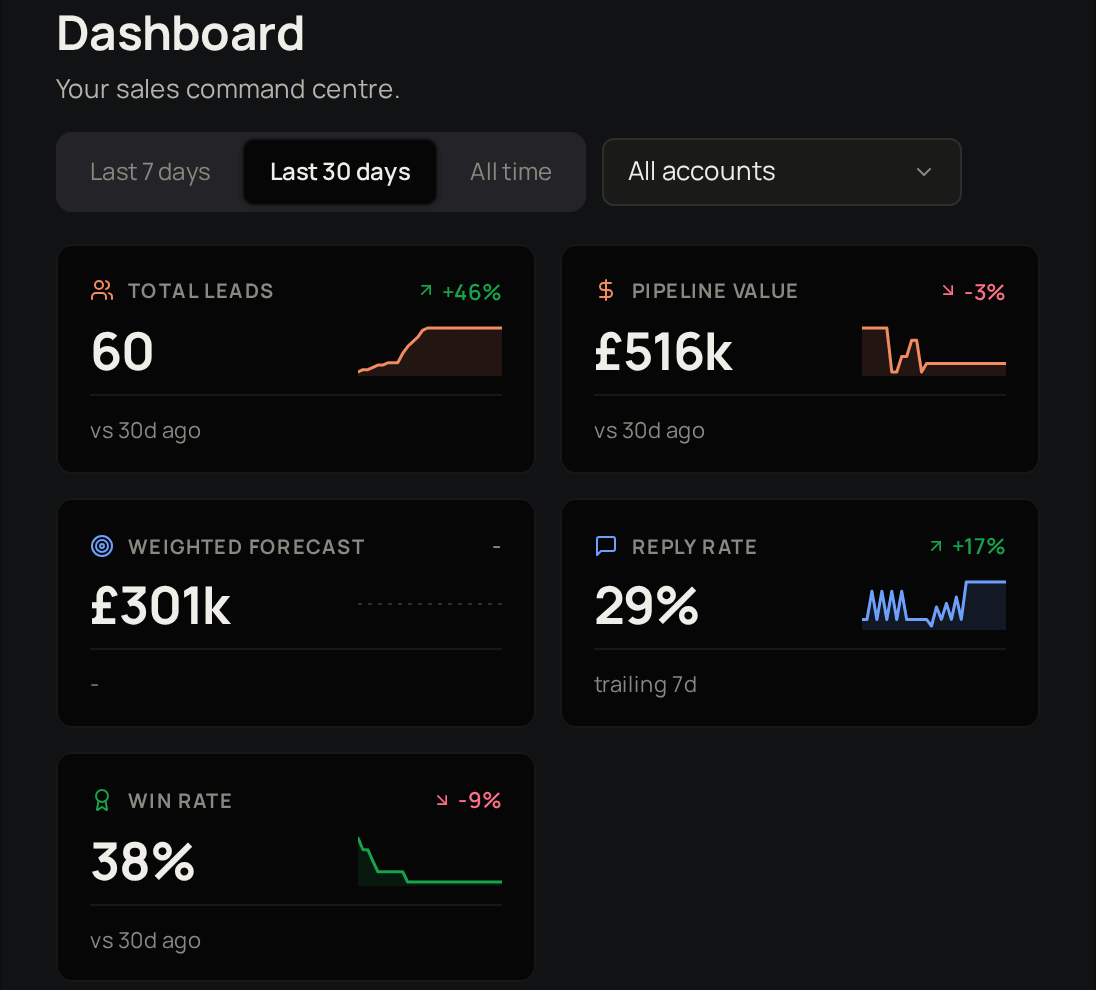 | Area | What you do there |
| --------- | --------------------------------------------------------------------------------------------------------------------------------- |
| Overview | The **Dashboard** shows pipeline value, forecast, reply rate and win rate. |
| Sales | **Pipeline**, **Deals**, **Quotes**, **Inbox** and **Drafts**: follow contacts and opportunities, send quotes and answer replies. |
| Customers | **Accounts** and **Contacts**: the companies and people you sell to. |
| Content | **Campaigns**, **Templates** and **Personas**: what you send, and who it is written for. |
**Settings** sits at the bottom of the sidebar.
## Contacts move through a pipeline
Added to Pulse, not contacted yet.
You have reached out.
They have written back.
Worth pursuing as a deal.
Not a fit, or not now.
Pulse moves a contact to Contacted when it sends them a campaign email, and to Replied when their reply reaches your inbox. You move them on from there.
## Deals move through stages
A deal starts at **Initial Contact** and moves through **Evaluation**, **Proposal** and **Negotiation** until it is **Closed Won** or **Closed Lost**. Each stage has a probability, and Pulse uses it to weight your forecast.
## Who can do what
| Task | Tenant Owner | Workspace Admin | Workspace Member |
| ------------------------------------------------------- | ------------ | --------------- | ---------------- |
| Add, import and edit contacts | Yes | Yes | Yes |
| Create personas and templates | Yes | Yes | Yes |
| Create a campaign and send its messages | Yes | Yes | Yes |
| Reply in **Inbox** and send your drafts | Yes | Yes | Yes |
| See **All team drafts** | Yes | Yes | No |
| Create deals and move contacts and deals between stages | Yes | Yes | Yes |
| Build a quote | Yes | Yes | Yes |
| Send a quote | Yes | Yes | No |
| Add quote templates in Studio settings | Yes | Yes | No |
| Change Pulse settings | Yes | Yes | View only |
## Where to start
Bring in the people you already sell to.
Set up personas and message templates.
Send a sequence of messages to the contacts you choose.
Price a deal and get it accepted.
## Related products
The companies you sell to in Pulse are the same accounts your learners belong to in Lexis.
Your Pulse deals are a built-in source in Prism, with no export or import step.
Support for your clients, with every ticket in one place.
Chatbots that answer from your own knowledge.
Manage, test and improve your AI prompts.
| Area | What you do there |
| --------- | --------------------------------------------------------------------------------------------------------------------------------- |
| Overview | The **Dashboard** shows pipeline value, forecast, reply rate and win rate. |
| Sales | **Pipeline**, **Deals**, **Quotes**, **Inbox** and **Drafts**: follow contacts and opportunities, send quotes and answer replies. |
| Customers | **Accounts** and **Contacts**: the companies and people you sell to. |
| Content | **Campaigns**, **Templates** and **Personas**: what you send, and who it is written for. |
**Settings** sits at the bottom of the sidebar.
## Contacts move through a pipeline
Added to Pulse, not contacted yet.
You have reached out.
They have written back.
Worth pursuing as a deal.
Not a fit, or not now.
Pulse moves a contact to Contacted when it sends them a campaign email, and to Replied when their reply reaches your inbox. You move them on from there.
## Deals move through stages
A deal starts at **Initial Contact** and moves through **Evaluation**, **Proposal** and **Negotiation** until it is **Closed Won** or **Closed Lost**. Each stage has a probability, and Pulse uses it to weight your forecast.
## Who can do what
| Task | Tenant Owner | Workspace Admin | Workspace Member |
| ------------------------------------------------------- | ------------ | --------------- | ---------------- |
| Add, import and edit contacts | Yes | Yes | Yes |
| Create personas and templates | Yes | Yes | Yes |
| Create a campaign and send its messages | Yes | Yes | Yes |
| Reply in **Inbox** and send your drafts | Yes | Yes | Yes |
| See **All team drafts** | Yes | Yes | No |
| Create deals and move contacts and deals between stages | Yes | Yes | Yes |
| Build a quote | Yes | Yes | Yes |
| Send a quote | Yes | Yes | No |
| Add quote templates in Studio settings | Yes | Yes | No |
| Change Pulse settings | Yes | Yes | View only |
## Where to start
Bring in the people you already sell to.
Set up personas and message templates.
Send a sequence of messages to the contacts you choose.
Price a deal and get it accepted.
## Related products
The companies you sell to in Pulse are the same accounts your learners belong to in Lexis.
Your Pulse deals are a built-in source in Prism, with no export or import step.
Support for your clients, with every ticket in one place.
Chatbots that answer from your own knowledge.
Manage, test and improve your AI prompts.